Never Lose an Event Again
Getting Started with Namastack Outbox for Spring Boot

You saved the order. You published the event. But only one of them actually happened.
If you’ve ever written a @Transactional method that saves something to the database and sends a message to Kafka or calls an external API, you’ve written a dual-write. And dual-writes break. Silently.
In this article, we’ll walk through the Transactional Outbox Pattern — the industry-standard solution to this problem and implement it in a Spring Boot application using Namastack Outbox, a production-grade library that makes the pattern trivial to adopt.
⭐ If you like this lib, please star the repo on GitHub
The Problem: Dual Writes
Here’s a pattern you’ve probably written — or at least seen a hundred times:
@Service
public class OrderService {

    @Transactional
    public void createOrder(CreateOrderCommand command) {
        Order order = orderRepository.save(Order.create(command));

        // Publish event to Kafka
        kafkaTemplate.send(”orders”, new OrderCreatedEvent(order.getId()));
    }
}
Looks clean. Feels safe. Isn’t.
Three things can go wrong here:
1. DB succeeds, Kafka fails. The order exists, but no event was ever published. Downstream services never find out. The customer gets charged but never receives a confirmation email.
2. Kafka succeeds, DB rolls back. The event was published, but the order doesn’t exist. Downstream services process a phantom event. The warehouse starts packing an order that was never placed.
3. Both succeed, app crashes before commit. The Kafka message is out there, but the transaction never committed. You now have an event for an order that never existed.
These aren’t theoretical edge cases. Under load, with network timeouts and container restarts, they happen regularly. The core issue is that saving to a database and sending a message are two separate operations that can fail independently. You can’t wrap them in a single ACID transaction.
The outbox pattern eliminates this by making event publishing part of the same database transaction.
How the Outbox Pattern Works
The Transactional Outbox Pattern is conceptually simple:
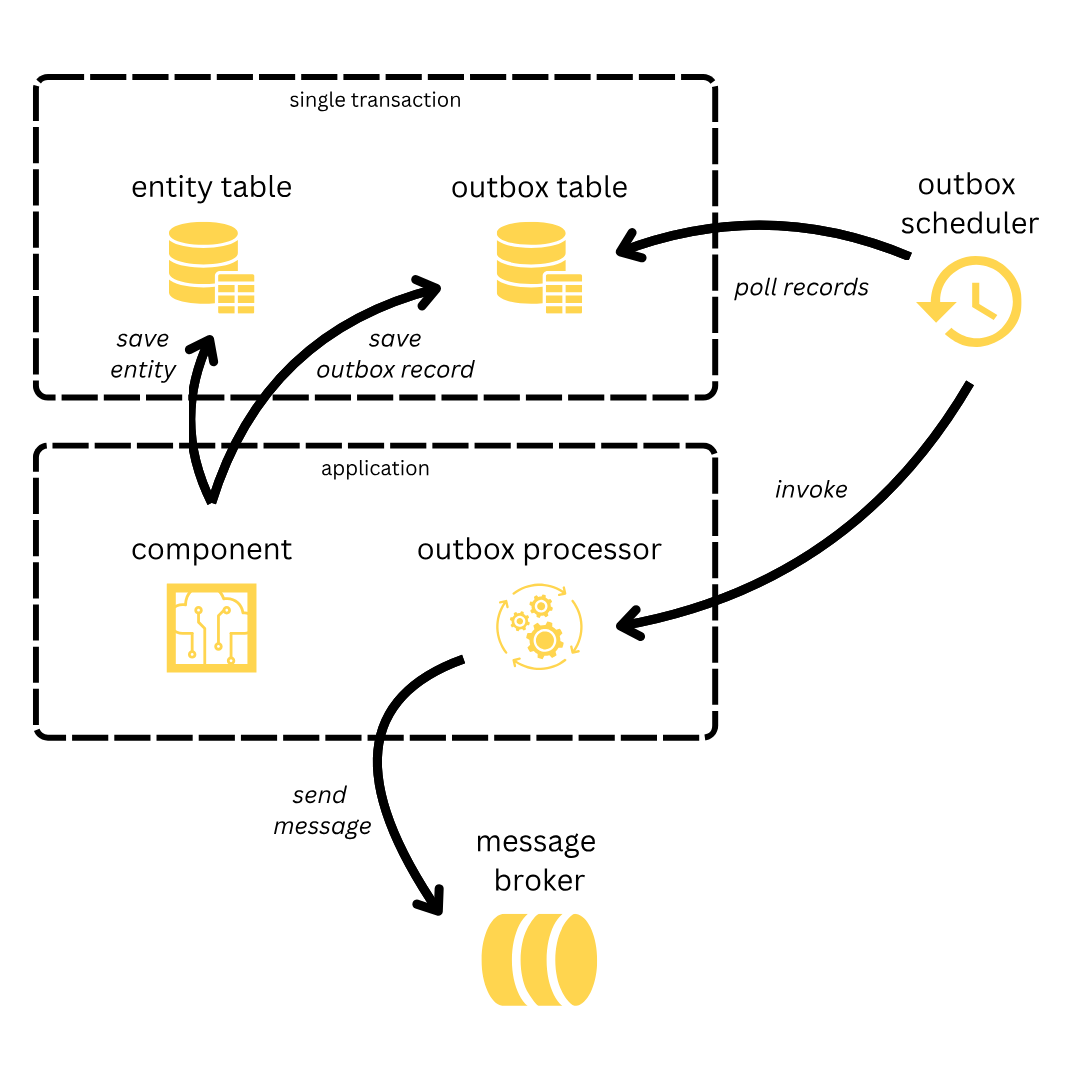
1. Write both business data and the event record in the same database transaction. Instead of sending a message to Kafka, you write a row to an “outbox” table. Because both writes go to the same database, they’re covered by the same ACID transaction.
2. A background poller reads new outbox records. A scheduler periodically queries the outbox table for unprocessed records.
3. Records are dispatched to handlers. Each record is passed to your handler — which can publish to Kafka, send an email, call a webhook, or do anything else.
The key guarantee is atomicity: either both the business data and the outbox record are persisted, or neither is. No more dual-write window.
One important note: the outbox pattern provides at-least-once delivery. If the handler succeeds but the record isn’t marked as completed before a crash, it will be processed again. This means your handlers should be idempotent — processing the same event twice should produce the same result.
Setting Up the Project
Let’s build a simple customer registration service that reliably publishes events when a new customer signs up.
Prerequisites:
- Java 17+
- Spring Boot 4.0+
- Any SQL database (we’ll use H2 for simplicity)
Step 1: Add the dependency
dependencies {
    implementation(”io.namastack:namastack-outbox-starter-jdbc:1.4.0”)
}
Or with Maven:
<dependency>
    <groupId>io.namastack</groupId>
    <artifactId>namastack-outbox-starter-jdbc</artifactId>
    <version>1.4.0</version>
</dependency>
That single dependency gives you:
Auto-configuration — all beans are registered automatically.
Automatic schema creation — the outbox tables are created on startup (JDBC starter only).
Automatic Scheduling — the background poller is activated without any manual annotation.
Sensible defaults — 2-second polling interval, batch size of 10 (record keys), exponential retry.
Step 2: Configure your datasource
spring:
  datasource:
    url: jdbc:h2:mem:demo;DB_CLOSE_DELAY=-1;DB_CLOSE_ON_EXIT=FALSE
    driverClassName: org.h2.Driver
    username: sa
    password:
That’s the entire infrastructure setup. No Kafka broker, no RabbitMQ container, no extra configuration files. The outbox lives in your existing database.
Creating Your First Handler
An outbox handler is the code that processes records after they’ve been persisted. You have two options: annotation-based and interface-based (great for explicit typing).
Typed handler — processes a specific event type:
public class CustomerEventHandlers {

    private static final Logger logger = LoggerFactory.getLogger(CustomerEventHandlers.class);

    @OutboxHandler
    public void handleRegistration(CustomerRegisteredEvent payload) {
        logger.info(”New customer registered: {}”, payload.getEmail());
        ExternalMailService.send(payload.getEmail());
    }
}
That’s it. Namastack Outbox detects the method parameter type CustomerRegisteredEvent and only invokes this handler when a record with that payload type is processed.
Generic handler — processes any event type:
You can also create a catch-all handler that receives every record, regardless of type. The second parameter OutboxRecordMetadata gives you access to the record’s key, context, timestamps, and failure count:
@Component
public class GenericKafkaOutboxHandler {

    private final KafkaTemplate<String, Object> kafkaTemplate;

    public GenericKafkaOutboxHandler(KafkaTemplate<String, Object> kafkaTemplate) {
        this.kafkaTemplate = kafkaTemplate;
    }

    @OutboxHandler
    public void handleAny(Object payload, OutboxRecordMetadata metadata) {
        kafkaTemplate.send(”outbox-events”, metadata.getKey(), payload);
    }
}
How handler matching works:
1. Typed handlers are matched by payload type. A handler for CustomerRegisteredEvent only receives records with that payload type.
2. Generic handlers (accepting Object) receive every record — they’re catch-alls.
3. Invocation order: all matching typed handlers run first (in registration order), then all generic handlers.
The OutboxRecordMetadata parameter is always optional — include it if you need the extra context, omit it if you don’t.
Scheduling Records Atomically
Now for the critical part — persisting events atomically with your business data:
@Service
public class CustomerService {

    private final CustomerRepository customerRepository;
    private final Outbox outbox;

    public CustomerService(CustomerRepository customerRepository, Outbox outbox) {
        this.customerRepository = customerRepository;
        this.outbox = outbox;
    }

    @Transactional
    public Customer register(String firstname, String lastname, String email) {
        Customer customer = Customer.register(firstname, lastname, email);
        customerRepository.save(customer);

        CustomerRegisteredEvent event = new CustomerRegisteredEvent(
            customer.getId(), firstname, lastname, email
        );

        outbox.schedule(event, customer.getId().toString());

        return customer;
    }
}
Let’s break down what’s happening:
outbox.schedule(payload, key)does not send anything. It writes a row to theoutbox_recordtable. Because this call happens inside a@Transactionalmethod, it’s part of the same database transaction ascustomerRepository.save()`.The
keyparameter is important. Records with the same key are always processed sequentially, in insertion order, by the same application instance. This guarantees ordering for related events. For example, all events for customercustomer-abcwill be processed in the exact order they were created — even across multiple application instances.
Alternative: @OutboxEvent with Spring’s ApplicationEventPublisher
If you prefer a more Spring-idiomatic approach, you can annotate your event class with @OutboxEvent and use Spring’s native ApplicationEventPublisher:
@OutboxEvent(key = “#this.id”)
public class CustomerRegisteredEvent {
    private final UUID id;
    private final String email;
    // constructor, getters...
}

// Then in your service:
@Transactional
public Customer register(String firstname, String lastname, String email) {
    Customer customer = Customer.register(firstname, lastname, email);
    customerRepository.save(customer);

    eventPublisher.publishEvent(
        new CustomerRegisteredEvent(customer.getId(), email)
    );

    return customer;
}
The #this.id is a SpEL expression that extracts the key from the event object. Under the hood, Namastack Outbox intercepts the publishEvent() call and persists the event to the outbox table — atomically, within the same transaction.
Both approaches are equally valid. Choose based on your preference.
Adding Retry and Fallback
Real-world handlers fail. External services go down, APIs return 500s, networks drop packets. Namastack Outbox handles this with configurable retry policies and fallback handlers.
Configure retry in application.yaml:
namastack:
  outbox:
    retry:
      policy: exponential
      max-retries: 3
      exponential:
        initial-delay: 1000     # 1 second
        multiplier: 2.0
        max-delay: 60000        # 1 minute cap
With these settings, a failed record will be retried after 1s, 2s, 4s — then permanently failed after 3 retries.
Other policies are available: fixed (constant delay), linear (increasing by a fixed increment), and you can add jitter to any policy to prevent thundering herd effects.
Add a fallback handler:
When all retries are exhausted, you need a safety net. That’s what OutboxFallbackHandler is for:
@Component
public class CustomerEventHandlers {

    private static final Logger logger = LoggerFactory.getLogger(CustomerEventHandlers.class);

    @OutboxHandler
    public void handleRegistration(CustomerRegisteredEvent payload) {
        emailService.sendWelcomeEmail(payload.getEmail()); // might fail
    }

    @OutboxFallbackHandler
    public void handleFailure(CustomerRegisteredEvent payload, OutboxFailureContext context) {
        logger.error(”Failed to process customer {} after {} attempts”,
            payload.getId(), context.getFailureCount());
        deadLetterQueue.publish(payload);
    }
}
The fallback handler is automatically matched by payload type — just like regular handlers. It receives an OutboxFailureContext with failure count, last exception, and metadata. If the fallback succeeds, the record is marked as COMPLETED.
No record is ever silently lost. It either succeeds, gets retried, or hits the fallback.
Next Steps
You’ve just built a reliable event pipeline with one dependency and zero infrastructure overhead. Here’s where to go from here:
Messaging integrations: Add
namastack-outbox-kafka,namastack-outbox-rabbit, ornamastack-outbox-snsfor out-of-the-box Kafka, RabbitMQ, or AWS SNS publishing with flexible routing and header mapping.Horizontal scaling: Running multiple instances? Namastack Outbox uses partition-based coordination to distribute work across instances while maintaining strict ordering per key. No duplicates, no race conditions.
Observability: Add
namastack-outbox-metricsfor Micrometer metrics,namastack-outbox-tracingfor distributed tracing, ornamastack-outbox-actuatorfor management endpoints.Spring Modulith: Namastack Outbox is an official Spring Modulith event externalization backend via
spring-modulith-starter-namastack. Your modular monolith gets transactional event guarantees with zero outbox-specific code.Context propagation: Use
OutboxContextProviderto automatically capture and propagate trace IDs, tenant info, or correlation IDs across the async boundary.
Check out the full documentation, explore the example projects, or jump into GitHub Discussions.
Wrapping Up
The Transactional Outbox Pattern isn’t new — it’s a battle-tested approach used by companies like Netflix, Uber, and Shopify. What Namastack Outbox does is make it trivial for Spring Boot applications.
If your app publishes events, you need an outbox. And now there’s no reason not to have one.
⭐ If you like this lib, please star the repo on GitHub